MetronHR for your team, in your pocket
Clock in with the timer, swap shifts, request holiday: the MetronHR app brings time tracking, shift planning and absences to the phone, even without an internet connection, and puts the timer in the menu bar on Mac and Windows.




- Every deviceiPhone, Android, Mac and Windows
- Works offlineSyncs as soon as there is signal again
- FreeFor every MetronHR team
- GDPR compliantServers in Nuremberg and Falkenstein
Everything your team needs on the move
The most important MetronHR features are as quick to reach in the app as they are at the desk.
- Time tracking
Clock in with the timer, one tap is enough
Start, pause and stop working time straight from the phone. Every hour lands with the right client, the right project and the right service by itself.
- A live timer with start, pause and stop
- Assigned to client, project and service
- Hours can also be entered by hand afterwards
- Take the last entries as a template
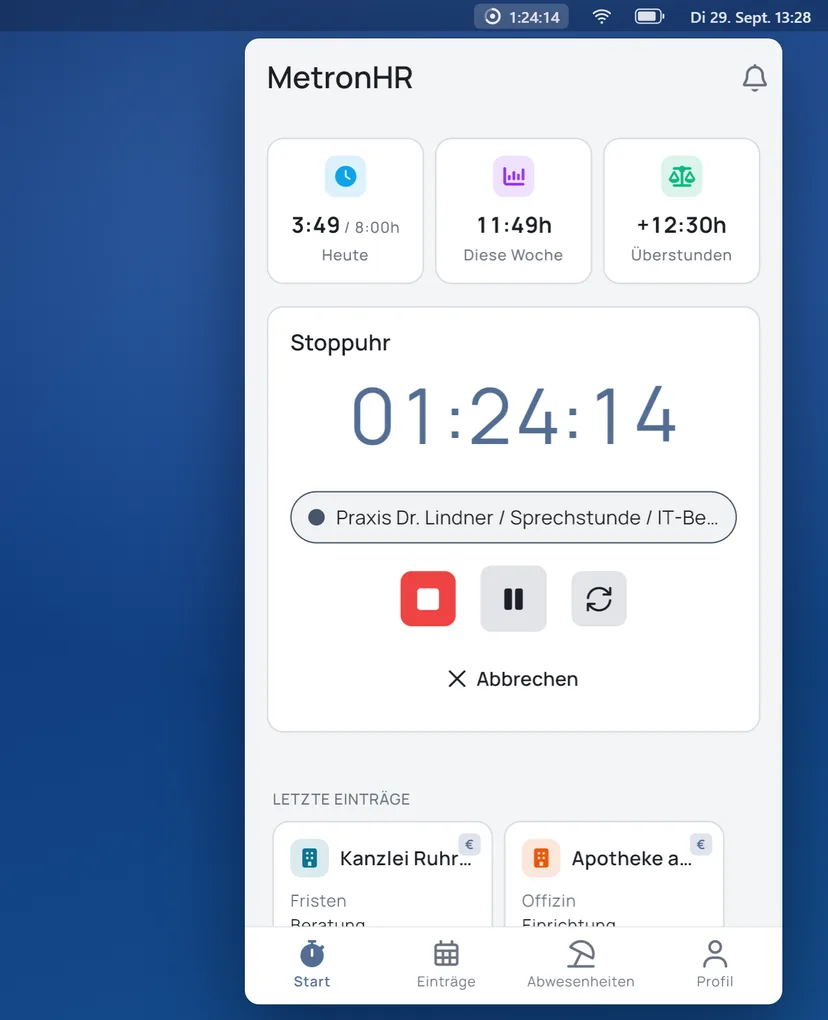
MetronHR3:49hToday32:22hWeek+4:30hBalanceStopwatch01:24:15Dr Lindner practice, consultation hoursRuhrmann law firm, deadlinesRecent entriesRuhrmann law firmDeadlinesApotheke am MarktDispensaryStartEinträgeAbsentProfile - Absences
Request holiday wherever you are
Request holiday, sickness or working from home in seconds, and see at once who on the team is available when. Every approval arrives as a push message.
- An absence request in a few taps
- Follow the status of your own requests live
- Team absences at a glance
- A push notification on approval
AbsencesLeave 202610Pending5Taken12RemainingHoliday12 to 23 OctoberOpenFlexitime2 OctoberApprovedHoliday3 to 7 AugustApprovedTraining14 JulyApprovedStartEinträgeAbsentProfile - Shift planning
Shifts under control: feed, swap and shift market
All your own shifts in the feed, confirmed or declined with one tap. Swap shifts directly with colleagues or offer them on the shift market, on-call duty included.
- A personal shift feed with every date
- Confirm, decline or swap shifts
- Take on free shifts from the shift market
- On-call duty and escalations right in the app
RotaWeek 36Mon06:00 – 14:00FrühdienstTue14:00 – 22:00SpätdienstWed06:00 – 14:00FrühdienstThu14:00 – 22:00SpätdienstFreiFri06:00 – 14:00FrühdienstSat09:00 – 13:00On-call dutyStartEinträgeAbsentProfile
The timer in the menu bar
If you work at a desk, you no longer need to open MetronHR in the browser first. The desktop app for Mac and Windows sits in the menu bar or the taskbar and shows the running time. One click starts, pauses or stops it.
- Mini bar with the running time and job, switched with one click
- A reminder when nothing is recorded in the morning or the timer is still running in the evening
- After a screen lock or sleep, the app asks whether the time away was a break
- Keyboard shortcuts for the timer and the window, starts with the computer
- Entries, absences and hours balance as in the phone app, with the same login
The full range of features
From time tracking to on-call duty, this is what the MetronHR app can do.
Live timer
Start, pause and stop working time, in real time.
Manual entries
Add forgotten hours at any time.
Client, project and service
Every hour lands in the right place by itself.
Allowances in view
See your clients' hour packages right in the app.
Shift feed
All your own shifts clearly in one place.
Swap shifts
Swap shifts with colleagues, with approval.
Shift market
Offer free shifts or take one on yourself.
On-call duty
Accept on-call assignments and handle escalations.
Request absences
Report holiday, sickness and working from home in seconds.
Team availability
See who on the team is in when, calendar included.
Dashboard and figures
Today, this week and the overtime balance at a glance.
Push notifications
What matters at once: approvals, shifts, notices.
Works where there is no signal
The app loads everything important onto the device. Your team can record hours and look at shifts even without an internet connection, and it syncs by itself as soon as there is a signal again.
- Recording without a signalA building site, a basement or a train with no signal: hours and requests work anyway.
- Automatic syncAs soon as there is a connection again, the app reconciles everything in the background.
- Nothing gets lostEvery entry is stored locally and transferred reliably.
Sign in securely, the way you want
A convenient login with no compromise on security.
Passkey
Sign in within seconds, without a password, using the passkey on your device.
Two-Factor Authentication
Extra protection through a second factor for sensitive personnel data.
QR code login
Signed in on the desktop? Carry it over to the phone in an instant with a QR code.
Several companies, one app
If you belong to several teams, you switch company with one tap.
Related
Where to go from here, and what waits for you there.
Frequent questions about the app
The essentials about the MetronHR app for phone and computer.
Question not answered here? Every step is explained in the help centre.
Send us a messageWhat does the MetronHR app cost?
The app is free. It is part of MetronHR: everyone on the team with a MetronHR login can use it at no extra cost.
Do I need a MetronHR account to use the app?
Yes, the app is the mobile companion to MetronHR. You sign in with your existing MetronHR account, by password, passkey or QR code login from the desktop.
Does the app work offline too?
Yes. The app loads everything important onto the device. You can record hours and look at shifts without an internet connection. As soon as there is a signal again, the app syncs everything by itself.
Which devices is the app available for?
For iPhone and iPad on the App Store, for Android devices on Google Play, for the Mac on the Mac App Store and for Windows in the Microsoft Store. On the phone the app has the full range of features; on the computer it sits in the menu bar or taskbar as a timer and also shows entries, absences and the hours balance.
Can I switch between several companies in the app?
Yes. If your account belongs to several teams, you switch between companies with one tap, without signing in again.
Is my data safe in the app?
All data is transmitted encrypted and processed GDPR-compliantly in German data centres. Passkey and two-factor authentication are available for signing in.
Get the MetronHR app
Free for every MetronHR team, available for iPhone, Android, Mac and Windows.
Prefer to work at a computer? Open MetronHR in the browser