The time clock nobody has to explain
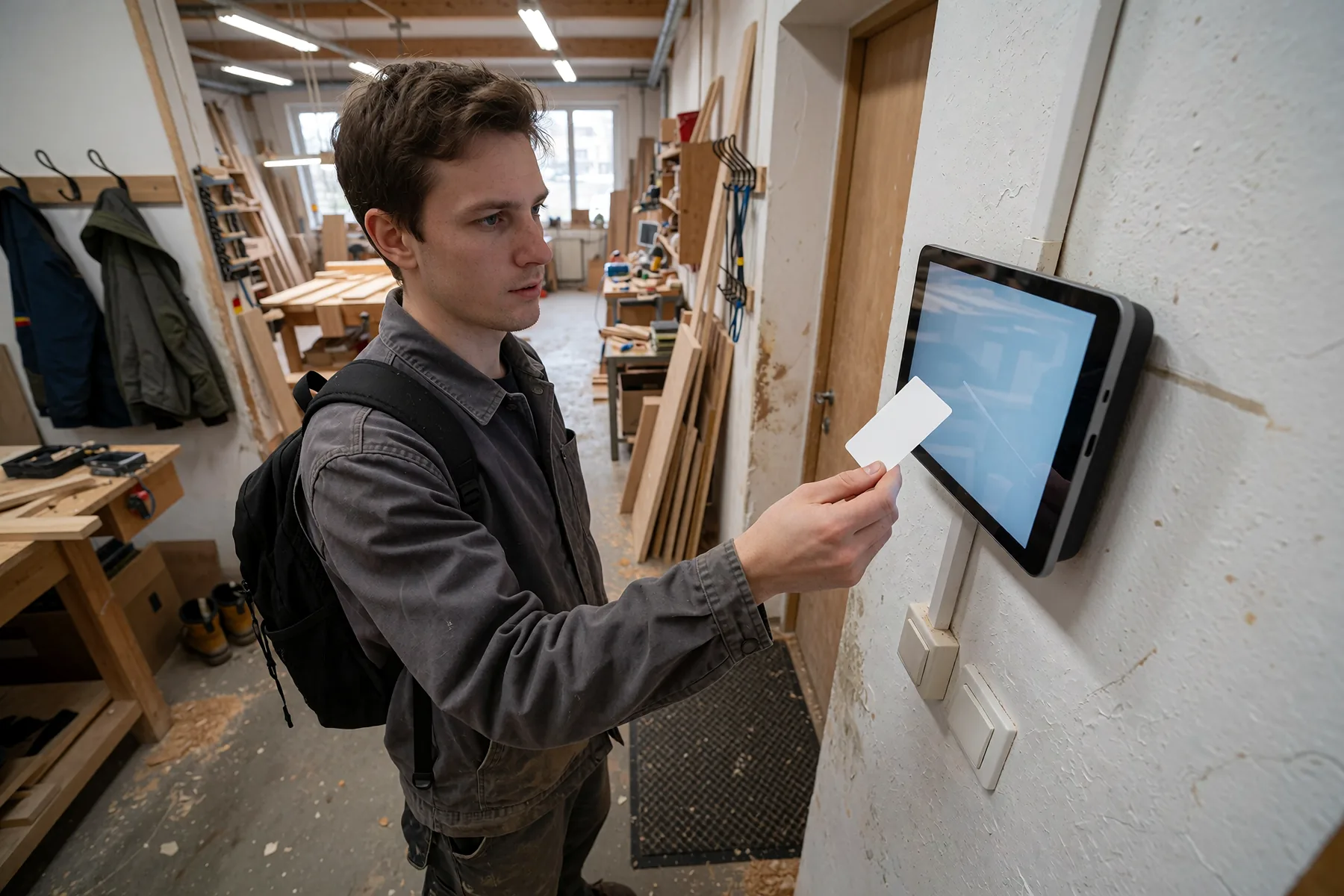
A terminal hangs on the wall, the team holds a card in front of it, and the time is in MetronHR. No signing in, no phone, no training. For everyone who has no computer in front of them while they work.
No credit card required · Cancel monthly
- No phone of your own needed, the card is enough
- Recorded to the minute, without rounding
- No fingerprint, no face image, just the card
- Keeps booking when the network goes down
- Made in GermanyDeveloped and hosted in Germany
- Certified data centreISO 27001, located in Germany
- Web, app and terminalBrowser, iPhone, Android, Mac, Windows
- GDPR compliantServers in Nuremberg and Falkenstein
Those without a computer clock in on paper
In production, in the workshop, in the kitchen and in the warehouse there is no desk with a screen. Working time therefore ends up on a sheet on the wall, in a spreadsheet at the month end, or in the shift lead's memory.
- Problem
The sheet gets typed up
At the month end somebody transfers handwritten hours into a table. That costs a day, and every transposed digit in it only shows up in the payroll.
- Problem
Not everyone wants the app on their private phone
Clocking in by phone assumes a device, a login and the willingness to use both. In many businesses phones are not allowed on the shop floor anyway.
- Problem
Old time clocks will not give up their data
The device counts hours, but the reporting ends at a printout or a file nobody can work with. Holiday, overtime and target hours sit somewhere else.
A device that does exactly one thing
The terminal shows the time and the location and waits for a card. Whoever holds one up gets their first name and the time as a receipt, and MetronHR decides from the last state whether that was a clock-in or a clock-out. Nothing else can be opened on the device.
No more typing upAn entry from the terminal is the same time entry as one from the web. Overtime, target against actual and the reports calculate with it without an intermediate step.

| day | Start | End | Break | Working time |
|---|---|---|---|---|
| Mon, 19 Oct | 07:30 | 16:00 | 0:30h | 8:00h |
| Tue, 20 Oct | 07:45 | 16:30 | 0:45h | 8:00h |
| Wed, 21 Oct | 08:00 | 15:15 | 0:30h | 6:45h |
| Thu, 22 Oct | 07:30 | 17:00 | 0:45h | 8:45h |
| Fri, 23 Oct | 07:30 | 13:30 | 0:00h | 6:00h |
| Week | 37:30h |
More than 6 hours on Friday: MetronHR deducts the break under § 4 ArbZG because none was clocked.
From the wall to the report
Setting it up is a matter of minutes and needs nobody from outside.
Connect the device
The terminal app reaches your own Android tablet through a setup code that MetronHR shows: reset the tablet, scan the code, and the device does the rest by itself. It then shows an eight-digit pairing code that is valid for 15 minutes. You type that into MetronHR, give the device a location name, and it belongs to your business. No cable, no installation media, no configuration file.
A second terminal is connected just as quickly
Pairing code on the device, entered on the web Kopplungscode471209valid for 10 minutesRFIDRegister the terminal471209Waiting for the devicePaired as “Reception”Kopplungscode471209valid for 10 minutesRFIDRegister the terminal471209Waiting for the devicePaired as “Reception”Once per device, then assign cards and you are doneAssign the cards
If somebody holds up a card that is still unknown, the terminal turns it away and reports it as a case to clear up. On the web you assign it to the person, and after that it works. Cards can also be entered in advance if the numbers are already known.
Existing staff cards can carry on being used
Assign waiting cards to a person on the web CardsReception terminalCards issued11 Sophie BraunCard 04:7F:3Cactive
 Tobias KrügerCard 04:1B:88active
 Ole Jansennew card 04:A2:19 read
The hours arrive, even without a network
If the wifi goes down, the terminal keeps booking and stores the entries locally. As soon as the connection is back, it delivers them.
A network outage costs not a single working hour
Buffered entries are transferred once the network is back Kein NetzClocking carries onVerbunden4 Entries syncedRFIDStored in the deviceIn, Anna Berg12:47Out, Jonas Krebs13:04In, Mara Brandt13:12Out, Greta Winkler13:30Nothing is lost, not even in a power cutKein NetzClocking carries onVerbunden4 Entries syncedRFIDStored in the deviceIn, Anna Berg12:47Out, Jonas Krebs13:04In, Mara Brandt13:12Out, Greta Winkler13:30Nothing is lost, not even in a power cut
What the terminal can do
From reading a card through a network outage to managing several devices.
- Privacy Policy
Only the card, nothing else
No biometric data, no debate about consent
Only the card is read. The device's fingerprint and face recognition are switched off. The terminal itself holds the first name for the receipt and the link between card and person, no surname and no photo.
What the terminal recordsThis, yesCard numberIn and outWelches Terminalminute, unroundedBreaksThis, noFingerabdruckPhoto or videoLocation of the personWhat the terminal recordsThis, yesCard numberIn and outWelches Terminalminute, unroundedBreaksThis, noFingerabdruckPhoto or videoLocation of the personWho sees whomGerundete Zeiten - Administration
Keeping the devices in view
A lost terminal is void in one click
On the web every connected terminal is listed with its location, last contact and version. A device can be blocked, and its credentials are invalid at once, and a replacement is paired in the same place.
Terminals3 devices · 2 sitesReceptionPractice · 2 min agoonlineLabPractice · 5 min agoonlineWarehouseAnnex · 3 hrs agooffline, buffering
- Recording
To the minute, without rounding
The time clocked is the time calculated
The terminal writes down the moment the card was held up, to the minute. Nothing is smoothed to quarter hours and nothing is cut at the expense of the person recording. Whoever arrives at 07:04 started at 07:04.
- Cards
Existing staff cards
Today's cards carry on working
Existing staff cards usually carry on working. Before you order we check that with one of your cards.
- Entry
Clocking in and out without choosing
Nobody presses the wrong button
MetronHR works out the direction from the person's last state. The terminal has no button and no choice for it. The receipt names the first name, the time and the direction.
- Offline
A buffer for the network outage
The business does not hang on the wifi
Entries are stored locally and encrypted and delivered after a network outage, with retries. Confirmed entries are deleted on the device at once; it gathers no archive.
- Operation
Kiosk mode: one device for one job
No repurposing, no support calls about other apps
The terminal app is the only interface. Nothing else can be opened on the device, not even the settings.
- Maintenance
Updates itself
Nobody has to get the ladder out
The terminal fetches its own updates. Several devices need no site visit either.
- Where it stops
Breaks and projects stay on the web
The queue at the device stays short
At the terminal there is no project picker, no cost centre, no correction and no approval. Corrections, requests and reports run on the web and in the app, where there is time for a form.
For everyone who works without a computer
Everywhere the work happens at a machine, at a bench or on a floor.
- Production and warehouse
A shift change without a bottleneck
- Thirty people change shift at the same time, and attendance is on a list outside the supervisor's office.
- One terminal at the entrance, one card per person, one entry per walk-past. The hours are in the system at once, even with several devices at several gates.
- Workshops and trades with a fixed site
Clocking in without a free hand
- With gloves on and oil on your hands, a phone is the wrong thing to operate.
- The card stays on the lanyard, holding it up takes a second, and the receipt can be read from two metres away.
- Care and practices
Attendance without signing in at a computer
- The computer is in the office, the work happens on the ward, and the hours come out of somebody's memory later.
- A terminal at the staff entrance, an entry on the way past. The hours flow into the same reports as duty planning.
- Payroll and accountants
Figures that were not typed up
- Handwritten timesheets are the most common source of error in payroll.
- A terminal entry is a time entry like any other and goes into the overtime calculation, the reports and the export.
Security and data protection
A device hanging publicly on a wall is a different security problem from a server. Correspondingly little sits on it.
- Only the card is read, no fingerprints and no face images
- The device holds the first name for the receipt and the link between card and person, nothing else
- GDPR compliant, hosted on German servers
Does your team sit at a computer?
Then no device on the wall is needed. A timer in the browser, the app on the phone, projects and clients included.
Related
Where to go from here, and what waits for you there.
- Without a phone
Clocking in without a company phone and without a private device
The question behind the terminal is usually a different one: nobody should have to hand over their private device. What that means for the three ways of recording hours.
See Without a phone Terminal offerings compared
Which vendors require their own hardware and where the terminal costs extra.
ViewDigital time clock
The comparison with the old punch clock, and what happens to it when you switch.
View
Frequent questions about terminal time tracking
What businesses want to know before they buy.
Question not answered here? Every step is explained in the help centre.
Send us a messageWhich device do I need?
Two routes. We pick a prepared wall terminal with a card reader to suit the business and ship it in kiosk mode. Or you take an Android tablet of your own: Android 9 or later, with NFC and with Google Play services. You set that up yourself, in MetronHR under Company, Terminals. The instructions with the setup code are there; the tablet then loads the app itself. If you would rather have hardware from us, drop us a line.
What does the terminal cost?
The price depends on the device and the quantity, so there is no figure here that would be wrong for your case. The software is included in the plan, and terminal access costs nothing extra. For a quote a short message with the number of sites and people is enough.
Does it work without the internet?
Yes. The terminal keeps booking and stores the entries locally and encrypted until the connection is back. A card the device has never seen cannot be resolved offline, though: it is reported as unknown rather than creating an entry the server would have to discard later.
Can I carry on using our existing cards?
As a rule yes. Before you order we check that with one of your cards, so it is clear beforehand whether the cards can stay in use.
Are fingerprints or faces recorded?
No. Only the card is read. Whatever biometrics a device ships with is switched off in our setup. That removes the whole discussion about biometric data under Article 9 GDPR, and it makes co-determination in the business considerably simpler.
Can somebody clock in for a colleague?
Anyone holding somebody else's card can hold it up, which is true of every card-based system. What MetronHR sets against that: every entry names the terminal, the time and the person and is documented traceably, cards can be blocked individually, and an unknown card is turned away rather than booked.
What happens if a terminal disappears?
You block it on the web, its credentials are invalid at once and it can book nothing more. You pair a replacement in the same place. The lost device holds first names and card assignments, no surnames, no photos and no complete personnel file.
Can breaks or projects be booked at the terminal?
No, and that is deliberate. At the device there is clocking in and out, nothing else. Breaks are calculated under the Working Hours Act, and projects, corrections and requests run on the web and in the app. A form on a wall with a shift queuing in front of it does not work.
Time tracking for people without a desk
Try MetronHR free for 14 days. If you need a terminal, talk to us and we will pick the right device.
- No credit card required
- Ready quickly
- Cancel monthly
- Full access to every feature
Questions about the hardware? Send us a message