Client allowance tracker as a free Excel template
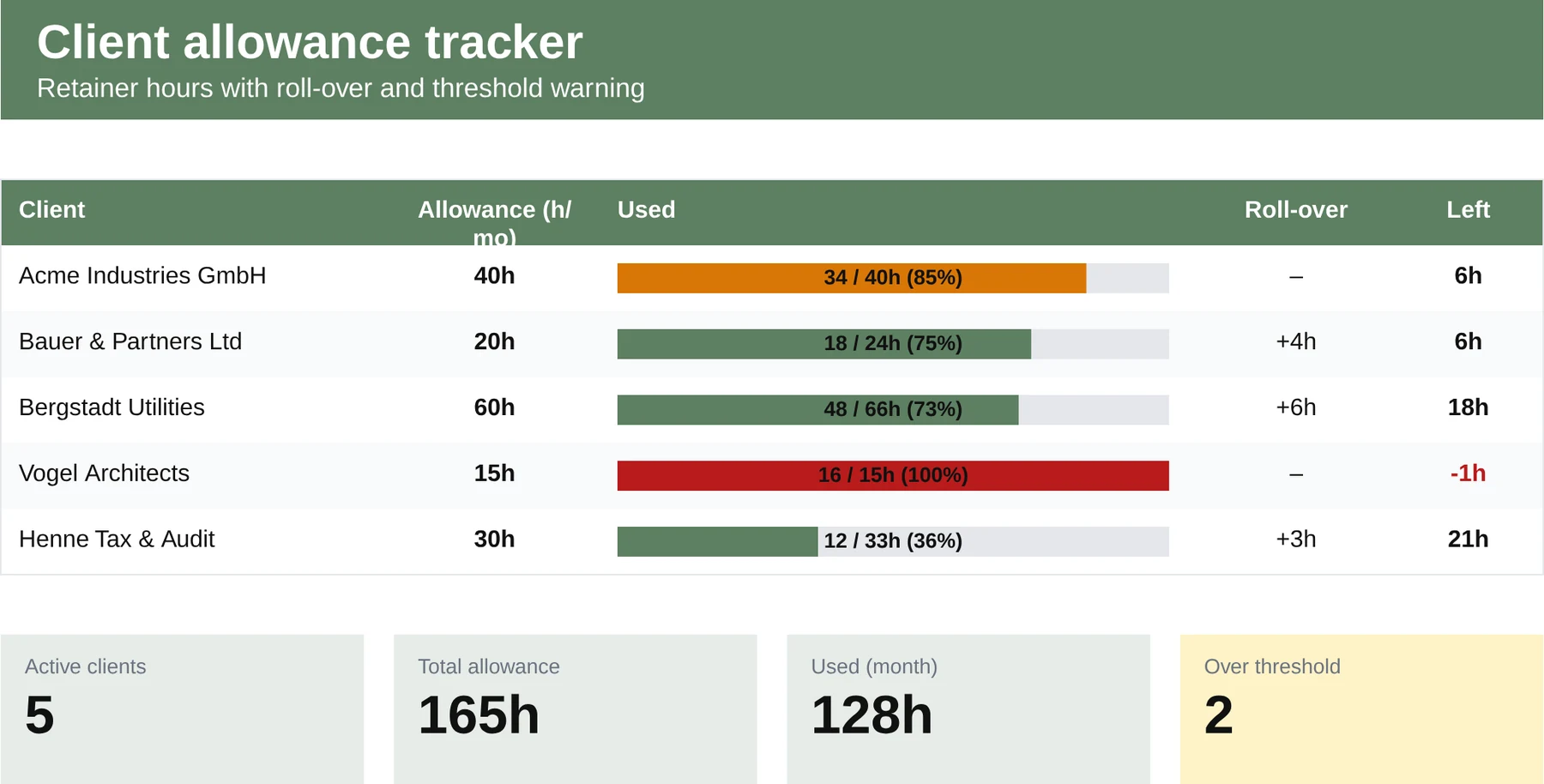
Hour packages per client in view: usage, roll-over and remaining balance per month, ideal for retainer models at agencies, IT service providers and law practices.
- No sign-up
- No newsletter
- Free to use
What is in the template?
Ready to use, with formulas, sample data and a legend.
- One block per client with a monthly hour allowance
- Columns for hours booked, hours used and the remaining balance
- Roll-over of unused hours into the following month
- An overview of all clients on a dashboard sheet
- A colour threshold warning when 80 per cent has been used
When does the template fit?
Ideal as an interim solution or for small teams, with clear limits.
- Agencies with monthly or quarterly retainers
- IT service providers with maintenance packages
- Tax firms and consultants with client allowances
Maintaining retainers costs time. That is exactly the time you sell.
With three clients the Excel tracker works. From ten clients with different contract models, roll-over rules and hourly rates, the upkeep becomes a line item of its own on the invoice. MetronHR links your team's time tracking directly to the client allowance: usage live, auto-renewal monthly, invoice prepared.
| Excel template | MetronHR | |
|---|---|---|
| Upkeep | Manual upkeep | Automatic calculations |
| Approvals | No workflows | Approval workflow |
| Reminders | No reminders | Reminders |
| Team | Copy again for every employee | One central source for the whole team |
Frequently asked questions
Answers on usage and legal aspects.
Question not answered here? Every step is explained in the help centre.
Send us a messageWhat is an „allowance“ or a „retainer“?
A contractually agreed hour package per period (20 hours a month, for example) at a fixed price. The hours are used across the month; depending on the contract, unused hours are refunded, carried over (roll-over) or lapse.
Does the template work for different contract periods?
Yes. The columns are organised by month. For quarterly allowances you enter the contracted hours in the first month of the quarter and use the roll-over field for the following months.
How do I keep track with many clients?
The enclosed dashboard sheet aggregates all clients into one overview: current usage in per cent, threshold markers and renewals due. In MetronHR you see the usage per allowance live, with no Excel upkeep.
Which competitors offer allowance management?
Pure time tracking such as Clockodo works with project budgets, not with client-bound allowances with roll-over. Classic HR suites such as HRworks, Personio or absence.io do not represent client-bound hour packages with roll-over according to our research (as at 06/2026). MetronHR covers the retainer model out of the box.
Templates are a start. MetronHR is the answer.
When Excel reaches its limits in a team, MetronHR takes over the process. Try it free for 14 days.
- No credit card required
- Ready quickly
- Cancel monthly
- Full access to every feature
Ready in 5 minutes, no credit card