Shift roster and duty roster as a free Excel template
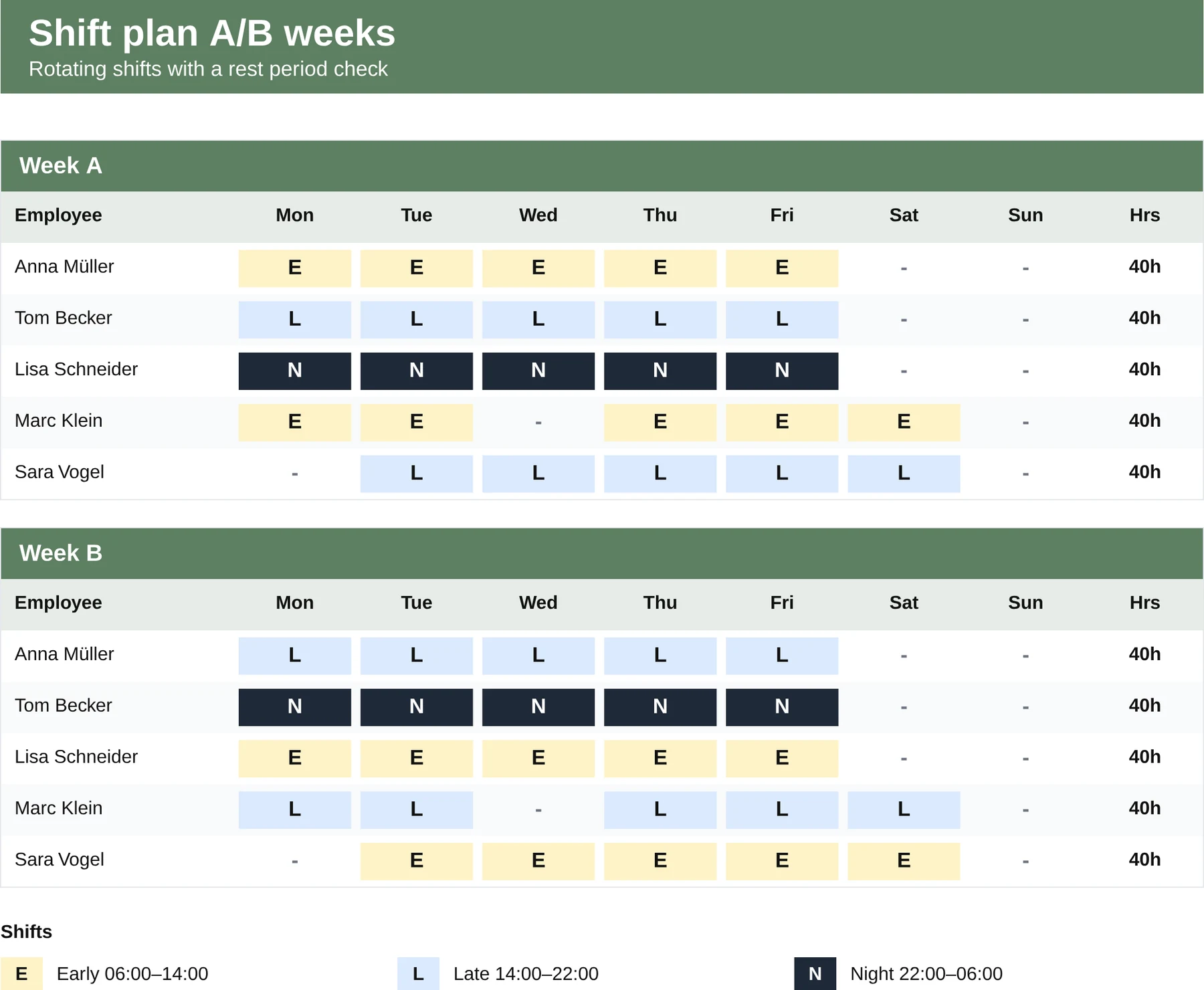
A duty roster with the classic A/B week pattern for rotating shifts (early, late, night), with an hours total per employee and a warning where rest periods are breached.
- No sign-up
- No newsletter
- Free to use
What is in the template?
Ready to use, with formulas, sample data and a legend.
- A weekly grid for the A week and the B week separately
- Three shifts prepared: early, late, night
- An automatic hours total per employee and week
- A warning column for rest period conflicts (under 11 hours)
- A legend with typical shift times to adapt
When does the template fit?
Ideal as an interim solution or for small teams, with clear limits.
- Manufacturing, warehousing and logistics with rotating shifts
- Hospitality and retail with weekly rotations
- Care and veterinary practices with standby duty
Planning shifts in Excel is possible. But rarely for long.
As soon as employees swap shifts, holiday appears in the plan, new joiners arrive and the rest period check under the Working Time Act is meant to be more than a hint, Excel becomes a source of errors. MetronHR plans shifts by drag and drop, checks rest periods and absences automatically, allows swap requests and delivers the plan in the mobile app, without anyone having to maintain the spreadsheet.
| Excel template | MetronHR | |
|---|---|---|
| Upkeep | Manual upkeep | Automatic calculations |
| Approvals | No workflows | Approval workflow |
| Reminders | No reminders | Reminders |
| Team | Copy again for every employee | One central source for the whole team |
Frequently asked questions
Answers on usage and legal aspects.
Question not answered here? Every step is explained in the help centre.
Send us a messageWhat is an A/B week shift pattern?
A rotating pattern in which employees alternate between two fixed weekly patterns, for example the early shift in the A week and the late shift in the B week. That distributes unpopular shifts fairly and makes the roster predictable.
Which shift times are preset?
By way of example: early 06:00–14:00, late 14:00–22:00, night 22:00–06:00. The times can be adjusted in the legend, and the formulas calculate with your values.
How does the template check rest periods?
The warning column marks days where less than 11 hours of rest lie between two consecutive shifts (section 5 ArbZG). The check is informative, not a hard validation. MetronHR blocks conflicting shifts directly during planning.
Can I extend the pattern to 3 or 4 weeks?
Yes. You duplicate the B week sheet and name it C or D, and the hours total formulas adapt automatically. For most industries two rotating patterns are enough, though.
Does the template work for a three-shift or four-shift model?
Early, late and night are prepared as a three-shift operation, with the times in the legend. For a four-shift model you enter the fourth shift in the legend and add a row to the weekly grid; the hours total includes the new row. What the template does not do is plan the staffing itself: who works which shift is your decision, and beyond a certain team size that is exactly the work MetronHR takes over.
Shift roster or duty roster, what is the difference?
In practice none: both terms describe assigning employees to working times. „Duty roster“ is more common in care, ambulance services and the public sector, „shift roster“ in manufacturing, retail and hospitality. This template fits both.
Templates are a start. MetronHR is the answer.
When Excel reaches its limits in a team, MetronHR takes over the process. Try it free for 14 days.
- No credit card required
- Ready quickly
- Cancel monthly
- Full access to every feature
Ready in 5 minutes, no credit card