Onboarding plan for office & knowledge work
A structured 90-day checklist for software, IT, marketing and administration, with hardware, access, mandatory training and probation milestones.
- No sign-up
- No newsletter
- Free to use
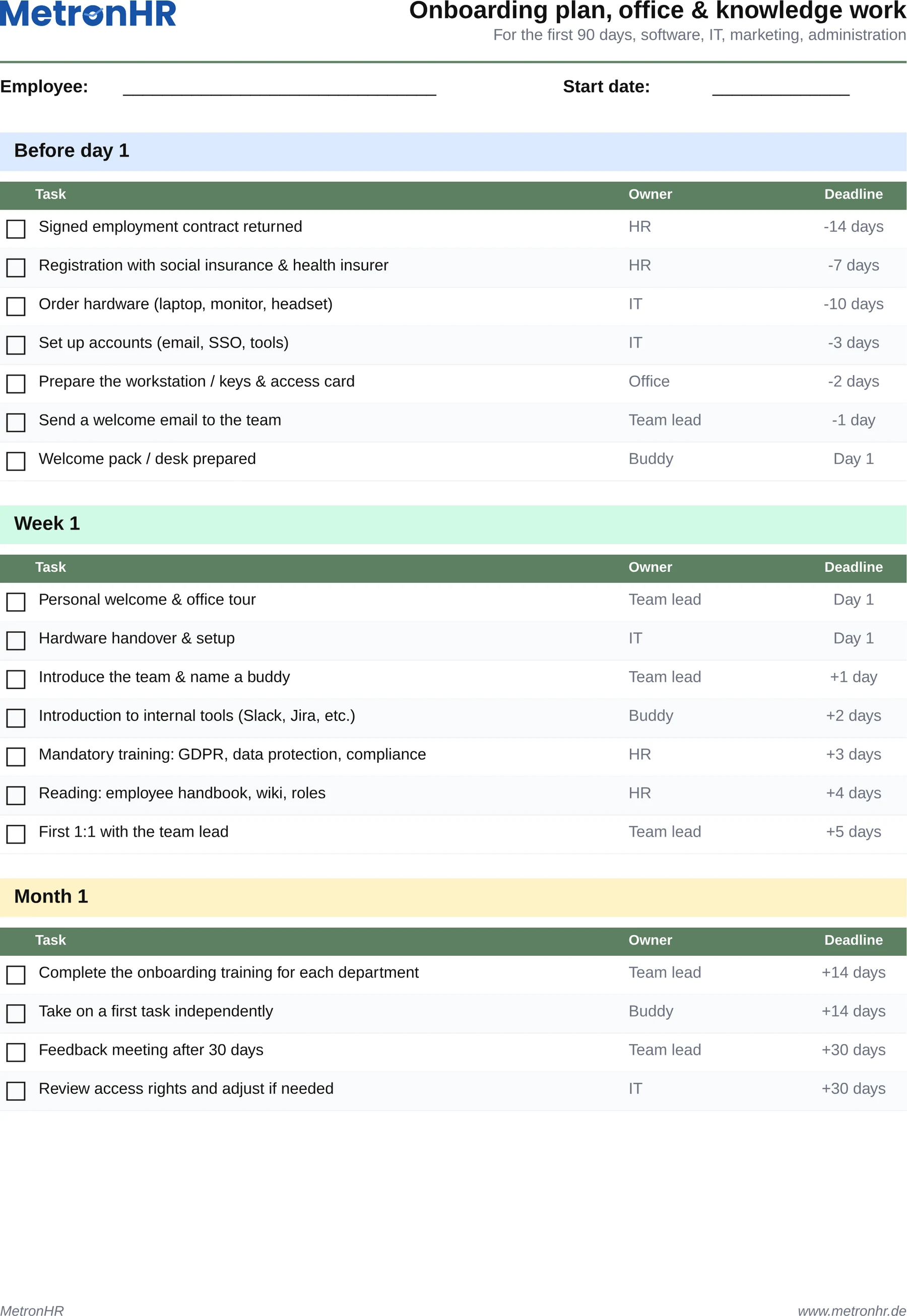
What is in the template?
Ready to use, with formulas, sample data and a legend.
- Tasks grouped: before day 1, week 1, month 1, month 3
- An owner per task (pre-filled per industry)
- Deadlines relative to the joining date, calculated automatically
- A status column with a dropdown (open / in progress / done)
- Pre-filled: order hardware, SSO and access, GDPR training, buddy system
- Including 30, 60 and 90 day feedback meetings
When does the template fit?
Ideal as an interim solution or for small teams, with clear limits.
- IT teams, agencies, software and consulting companies
- Administration, marketing, sales and back office
- A first structured onboarding without an HR system
A checklist reminds nobody. A workflow does.
Excel checklists work for the first new employee and are forgotten by the third. MetronHR turns the onboarding plan into a reusable workflow: tasks are assigned automatically, owners are reminded, and the status per employee is documented with editor and timestamp and linked to the personnel file.
| Excel template | MetronHR | |
|---|---|---|
| Upkeep | Manual upkeep | Automatic calculations |
| Approvals | No workflows | Approval workflow |
| Reminders | No reminders | Reminders |
| Team | Copy again for every employee | One central source for the whole team |
Frequently asked questions
Answers on usage and legal aspects.
Question not answered here? Every step is explained in the help centre.
Send us a messageWhich phases is the onboarding plan designed for?
The template covers four phases: before day 1 (order hardware, contract, access), week 1 (tour, tools, buddy), month 1 (onboarding training, first tasks), month 3 (feedback meeting, probation review).
I do not work in an office, are there other versions?
Yes. Alongside this office version there are tailored templates for retail and sales, hospitality in service, hospitality in the kitchen, trades and construction, care and doctors' and dental practices. You will find all seven versions on the overview page „onboarding plans by industry“.
Can I adapt the default tasks?
Yes. The template is openly editable: remove tasks, add tasks, adjust owners and deadlines, and save it as your company's master template.
What distinguishes a workflow from a checklist?
A checklist is a document; whoever looks at it sees the status. A workflow is a system: tasks are distributed automatically, deadlines monitored, owners reminded and the history documented. MetronHR delivers exactly that workflow automation, with the same task structure you find in the Excel template.
Templates are a start. MetronHR is the answer.
When Excel reaches its limits in a team, MetronHR takes over the process. Try it free for 14 days.
- No credit card required
- Ready quickly
- Cancel monthly
- Full access to every feature
Ready in 5 minutes, no credit card